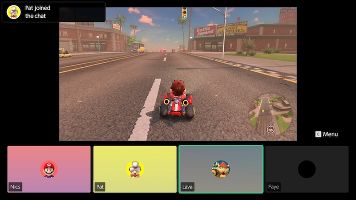

When the Switch 2 finally got its formal reveal back in an early April Nintendo Direct, one of the features Nintendo spent the most time hyping up was GameChat, the handheld console hybrid’s new video and voice party chat system. This was perhaps a strange choice, given that the footage used to sell viewers on the system’s strengths included a focus on low-framerate gameplay footage sharing with friends that didn’t make a stunning first impression.
Still, Nintendo seemed to think the feature was a winner, giving it its own dedicated button on the new system’s controller, and getting actor Paul Rudd to star in a commercial showing off the system’s potential.Having spent much of my first day with the Switch 2 playing around with GameChat, I believe two things are true – The video streaming footage Nintendo showcased in their initial reveal Direct was accurate, and in practice, I really didn’t mind its limitations.
At its most basic, GameChat is a voice chat application. You and your Switch 2 friends (No strangers, and only friends who you have handed over their mobile number to Nintendo) can join a voice call independently of being in the same game together. There’s a microphone built into the top of the Switch 2 system, which picks up your voice, and you’re ready to go.
I had been initially somewhat sceptical of the quality that we would get from a microphone built into the system, but in practice, it worked surprisingly well. The microphone picked up my voice clearly from a distance, and the system did a good job filtering out background noise like the hum of my office fan with ease. I didn’t try anything as noisy as a blender, but it does seem to have decent automated filters in place to process voice chat audio.
In a pleasantly surprising move, GameChat supports a number of accessibility features out of the box, many of which are far from standard across the board on console, and some of which I specifically did not expect to see Nintendo support at launch. Players who cannot speak can type text with a virtual or USB keyboard and have them read out as automated speech to their friends, and players who cannot hear or struggle with audio processing can turn on an automated speech to text transcript of their voice chat with their friends, with user icons next to each speaker.
The speech-to-text implementation in particular was surprisingly high quality, with transcription decently accurate, and as default vulgarity, transcribed accurately. This may seem like a funny thing to test, but a lot of automated text-to-speech programs automate blanking out swear words, meaning that Deaf users are left out of the loop on mature conversations. Deaf people deserve to know their friends swore when they beat them at Mario Kart World, after all, as much as I expected family friendly Nintendo to default to using a filter.
Beyond voice chat, Game Chat allows players to share their gameplay screen in real time with their friends in a series of small windows at the bottom of the screen. It is true, the framerate of these preview windows is pretty shocking at first, updating as more of a slideshow than fluid video. You can expand the view of one gameplay feed and the framerate and resolution will increase somewhat, but they’re still going to be a far cry from watching your favourite Twitch streamer’s live gameplay.
But, the thing is, in practice I didn’t really care that much. I found video sharing most enjoyable when it was supplemental information I was glancing at, much like screen cheating in an old splitscreen multiplayer shooter. You’re not stopping to watch extended amounts of gameplay, you’re trying to find your friend in Mario Kart’s free roam mode, or work out where your squadmate has run off to in Fortnite, or glancing over to see why your friend just groaned in defeat while playing some single player game they’re trying to beat. It’s a brief window to feel connected to your friends more than a way to sit down and watch them play. You can use it to watch a friend play as a dedicated activity, but that’s not what the feature feels designed for.
Then there’s webcam functionality. By plugging a USB Webcam into the Switch 2, players can add a greenscreen overlay of themselves to their gameplay window or share their camera feed rather than gameplay. This works decently, depending on your camera of choice.
While nothing stunning at 1080p, Nintendo’s official camera runs at a decent framerate and does a solid job creating a cheap and cheerful way to be on camera while playing with friends.
Hori’s Piranha Plant camera is another matter entirely.
I had assumed the unofficial camera’s biggest issue was its shockingly low 480p resolution, but far from it. The biggest issue with the Piranha Plant camera is its framerate, which felt like it couldn’t have exceeded the 5-10 FPS range. I’ve heard reports that the camera’s framerate improves if you’re not downloading software at the same time as using the camera, but even if accurate, that’s not an issue that should exist. The official camera worked just fine, even during download sessions. Don’t waste your money, get the official Nintendo camera if you’re getting one at launch.
However, the secret killer app of GameChat is GameShare, which allows you to stream compatible games over the internet to a friend, allowing them to play multiplayer without needing to own or download the game themselves.
In titles like F-Zero inspired racer Fast Fusion, a second viewpoint perspective of the game can be generated in the background and streamed to a friend, whose inputs are then streamed back to the original Switch 2. Where GameChat’s usual screen share functionality was unimpressive, GameShare did an impressive job of sending a high-quality video feed from my Switch 2 in London to another in New York, allowing for fast and responsive multiplayer gameplay for the user who was seeing a remote feed.
It’s this ability to boot up a game while in GameChat, and invite a friend to play along without being nearby or owning the game, that really stuck with me after my first day with the system. That’s the bit that felt like magic, and the feature I’m going to dig into more in the coming days.
So yeah, GameShare’s video quality is a little low, but that’s not as big a problem as it seems when you get it in your hands. For the first time, Nintendo has a pretty decent voice chat solution on console, and it has more going in its favour than it might first appear.