
World of Warcraft’s Midnight expansion is still a ways off, but the shape of it is starting to materialize on the distant horizon. The Warcraft team has been loosening the lid on what to expect with potentially the most anticipated feature in Player Housing. This week, we visited Blizzard’s Boston office for the Player Housing Summit to learn about building, customizing, and furnishing the interior of your Azerothian home. We also spoke with associate director of Midnight, Paul Kubit, and senior UI designer, Kat Dolan, about this novel way to express yourself in World of Warcraft and went hands-on demoing the decor tools. After a handful of hours playing a virtual home renovator, I’m blown away by the early build. It’s way more than I, and many at the event, expected it would or could be.
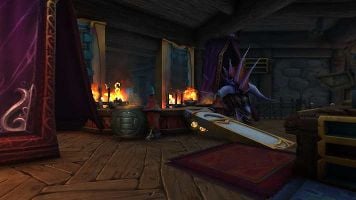
Players of World of Warcraft have long gathered in places across Azeroth, but it’s a completely different experience in your own personalized space. WoW isn’t just getting player housing; the game is getting an impressive, robust, and surprisingly flexible system for players to express themselves. Sitting down at my demo station, I was greeted with a foyer already furnished to show off what was possible using the available decor items and tools. Tables, chairs, a hearth, books, and other miscellany of common items litter the pre-furnished demo rooms.
They feel purposefully cluttered and lived in, much like a populated building you’d find in any of World of Warcraft’s towns. It was a promise of what’s possible for players in their own livable spaces. Though, because it was made by Warcraft’s art team, that made it feel unbelievable. I soon found out these ambitious room layouts are wildly within my reach, at least with a lot of time, patience, and practice. Thankfully, the basic mechanics of decorating are extremely intuitive.
Clicking your edit button will open your Decor window, showing the expansive collection of items you’ve gathered while adventuring; Rugs, tables, shelves, platforms, food, dragon heads, weapons, display plaques, braziers, fence posts, openable doors, chests, flying books, readable tomes, wall partitions, and so much more can be placed in your house. Many of the items exist all over Azeroth, and the Warcraft team is working to utilize twenty years of existing assets to deck out your home. It’s part of why this feature is a long-time coming.
“The reason it’s taken us so long to finally build it is because the vision was big,” explains Kubit. “We didn’t want it to just be something stapled onto the side of the game and something which is incorporated and something which fully takes advantage of not only the years of backlog of existing assets but also sort of the social nature of an MMO and making sure that it didn’t feel like a place that you were going to go to be by yourself necessarily, but that it was built as a social experience.”
Decor items will come from all sorts of places around the game. You may find them from vendors, or pick them up while questing. Some objects will be exclusive to the hardest content and achievements in the game, making for a trophy to show off to visitors to prove you did something great.
Interacting with items could not be simpler, and allows players to decorate a basic bedroom in no time. Clicking and dragging the item from your stash brings that item into the space. To change its position you can drag it around and rotate it on a single axis with the scroll wheel. By default, items will snap onto spots on a grid and can be placed on floors, surfaces, and other items you’d expect them to fit on.
My initial attempts at furnishing were less than creative. I dropped a wooden platform on the ground, then a table on top of it. I placed a lantern on the wall and then played around with some seating arrangements. In a matter of moments I had a crude living space, but nothing like what I saw upon starting the demo. But I wanted to get more ambitious with item placement, so that’s when I cracked into the more advanced set of options laid out in the toolbar at the bottom of the screen.
Want a more specific placement for a chair? Turn on free placement, which lets you put an item anywhere, regardless of whether it physically fits in the space. Turning off the grid snap allows for an incredibly minute and accurate placement of items. You can even resize items using the scale tool to make objects bigger or smaller. Floors, walls, and ceiling skins can be shifted with the customize button.
For example, we had the options for ivory Blood Elf walls and floors or natural wood surfaces common in Night Elf settlements, among others. Certain items can even have their colors changed, which will be more common with newer assets created alongside player housing. Becoming proficient with these options opened my eyes to what was possible in WoW’s now increasingly more exciting housing featureset.
The Summit group was treated to a demo run by Jay Huang, the principal artist and lead designer of the Decoration feature, who showed off what Decor customization can look like in the hands of a seasoned decorator. Starting with a double-tall room and enabling Free Placement, he quickly went to work out a lofted area with balcony seating, complete with food-covered tables and guard rails, and a cascading staircase using rotated pillars stuck against the wall.
He added rotated partitions around the room to give more shapes and crevices to the square room. Moving downstairs, Huang threw some bookshelves on the wall, with one backwards to create the illusion of an oven vent. Below, he created a surface, adding a metallic plate on top and clipped in a handful of scaled-down barrels to simulate a cooktop with burners. The restaurant was coming together, and only in a matter of minutes, albeit with the feature’s most skilled user.
We also got a glimpse of finished, complicated rooms jam-packed with objects to inspire our immediate creations. There were vertical libraries impossibly packed with shelves of books, long rustic studies with massive wooden buttresses, and cozy nooks filled with comfortable and relaxing spots for your long-suffering hero to kick back in with friends, all of which were possible with the items and features I had at the tips of my fingers.
Making most of Huang’s visual tricks possible are the two tools that will take the most practice to be proficient with: rotate and move. Unlike the previous features, these two act as if you’re making adjustments within a 3D modeling program. Yes, I mentioned a simple rotation method earlier, but this version lets you rotate decor on three axes by dragging three colored rings with no limitation on which direction it faces. Likewise, the move function populates arrows representing each of the X, Y, and Z axes, letting you make minor positional adjustments, float decorations in the air, and cram objects into one another for whatever effect you’re looking to create.
Despite having similar implementations to professional modeling programs, in context of decorating a room, the advanced tools are intuitive to use. “We really wanted to shoot for something that didn’t feel too much like just a 3D editing program, but maybe lean a little more into the magic,” says Dolan. “You don’t want to just go into decor mode and break the fantasy. We wanted to lean more into it like you’re almost casting a spell on your items, because it really matters to all of us that this still feels like you’re immersed in WoW.”
Having the ability to rotate, scale, and jam items into floors or other objects unlocks ample ways to incorporate specific items into the space the way you want them to fit. It can also create the illusion of new items by combining what you have at hand in creative ways. If you’re resourceful enough, your only limitation is your imagination. There’s no doubt people more creative than myself will do transformational things with decor customization.
My ultimate creation was a pro wrestling arena with a fiery entrance ramp flanked by giant Onyxia heads. The stage was made with a semicircular Pandaran table, with pyretic accents using large torches I phased into it. Using wooden platforms and a large circular emblem, I built the base of the wrestling ring and outlined the squared circle with fence objects to create the ropes, while Zandalari bookshelves were jammed into the side of the ring to approximate a decorative apron. I even spent time laying out floor mats, crowd guardrails, seating for fans, and an announce desk for commentators to call the action from, and played around with adding windows to the ceiling and tilting them towards the ring to create a spotlight effect.
I can’t understate how powerful and intricate the house decoration can be, and I had a blast messing around with even a fraction of those objects and tools. Days later, my mind is still running through ideas for the next time I can get my hands on it. My semi-elaborate wrestling arena didn’t come close to cracking the limit of objects players can use in the house. At least in this demo, we were allowed up to 10,000 items, although Jay Huang’s more elaborate concoctions have only scratched the surface, clocking in only around a tenth of that.
You’re not limited to filling your house with what you’ve collected, but there’s an entire mode to customize the rooms and layout of the house itself. Clicking the “edit floorplan” button shifts the camera into blueprint view. Here, you can add adjacent rooms with various sizes and shapes to build outward off of existing spaces and upward using pre-designed stairways or “tall” rooms to build high-ceilinged spaces that span multiple floors. While you have to be somewhat cognisant of where you’re placing a new room, you can always move an entire room to another spot, even if it’s already fully furnished.
My early addition to the wishlist of features is copy and paste to allow for repeated use of a piece of decor that’s already been scaled and shifted a particular way. There’s a long backlog that the team is working on implementing, and the list keeps getting longer. Thankfully, there’s still plenty of time before Midnight releases for housing to grow and adapt. It won’t be the end of it then, either, says Kubit.
“I think like one ray of light, I can shine on that is that this is not a Midnight-only feature, that this is intended to be a long-lasting journey. And the folks who are working on housing are not closing the book after Midnight goes live; that we intend to keep adding features and adding functionality and watching players play, and if they continue to build a particular way, then we work alongside them, as we always have to iterate and make the feature and the game better.”
Going into the summit, I wasn’t sold on the concept of player housing. I never understood the appeal. After my brief time playing with the decor demo and seeing what’s possible at a high level and what my colleagues were creating around me, I find myself inspired to get back into those corridors and create more fun spaces for my characters and guildmates to explore.
What’s possible with player housing’s customization options are shockingly deep, yet immensely approachable to grasp and learn to become comfortable with the more expert augmentations. It gives me a reason to want to play old content or try to take down tougher feats in order to collect spoils to take home again. Needless to say, there’s still a lot of work to be done on player housing and Midnight itself, but I’m desperate to get back into my home and see what kind of wild, cozy, and elaborate home I can whip up.