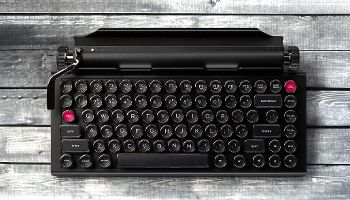

It’s only been about two months since I took a look at the Qwerkywriter, a vintage love letter to the age of typewriters. But the company is back and celebrating the 10-year anniversary of its launch with a brand new model, the Qwerkywriter Typewriter Keyboard 10-Year Anniversary Edition, which just launched on Kickstarter. It’s definitely an evolution of the design and quality it debuted with the version I looked at.
Early bird pricing begins at $199 and then bumps up to $219 once that supply has been swept up. If, like so many other typists, love the idea of a modern typewriter and want something with enough quality to match the idea, look no further. This is a keyboard you won’t want to miss.
Specifications
Current Price:
Early Bird: $199 (Kickstarter)
Standard Kickstarter Price: $219 (Kickstarter)
Retail Price: TBA
Shipping: Planned for August 2025
Qwerkywriter 10 Year Anniversary Edition – Design and Highlights
I’m going to level with you: I’m the exact target demographic for the Qwerkywriter. I grew up with a typewriter in the house, albeit one that wasn’t used much. But there was something about it that I just loved—the slam of the keys, the ink pressed into the page, and that feeling when you were done that you had something tangible, something classic. At the time, many of my favorite authors were using typewriters, and it was a connection that was hard to articulate at the time but meaningful in a deep way to the future writer I would become.
I had discovered the Qwerkywriter years before I ever got the opportunity to review it. I had missed it on Kickstarter, but it began making the rounds online, at least in my feed, as I began to look for keyboards during my college years. As a broke college student, I couldn’t afford it then, but loved the idea. Since then, typewriter-inspired keyboards are all over but, as someone that covers peripherals like this for a living, I don’t think any of them match the level of quality of the Qwerkywriter I reviewed in April.
The Qwerkywriter 10 Year Anniversary Edition is even better and it’s not even close. Qwerkytoys already had a lead on its competition but with this release there’s only two extra features I would love to see, but neither is a dealbreaker and likely won’t even matter to many users. I’m a keyboard nerd, you see.
Let’s start with the basics, because from a distance, you might not think that much has changed. The overarching design is similar. The keyboard still uses a 75% layout with dedicated arrow keys, a full function row, as well as a selection of navigation and editing buttons. It still uses the circular keycaps with narrow stems and is topped off with a roller-styled tablet stand complete with two usable knobs and a polished return bar.
That return bar isn’t just decoration, either. Pressed to the side, it clicks like any other switch. Fittingly, it sends Return by default but doubles as a macro controller, allowing you to record keystrokes and send them on the fly with a second press. The knobs are also genuinely useful. The right one controls volume while the left is mapped to page scrolling. Qwerkytoys has also done a great job of making these knobs feel good to use. They’re delightfully tactical, easy to access, and have the perfect amount of throw for scrolling and changing volume.
But while much of the visual identity is the same, there are tons of improvements coming with this release. Everything is enumerated in the chart above, but let me break it down further because these are meaningful improvements that impact virtually every aspect of its use, versatility, and performance.
For starters, one of the first visual indicators of the upgrade comes with the electroplating around the keycaps. I was originally sent the Chrome version, while this iteration comes with the blacked-out chrome. Technically, this was available in the past, but I still love the subtly sleek look of it. The electroplating process has been refined and improved, and the chromed layer around the edges has a more noticeably metallic feel, even just in normal use. It’s in keeping with the full aluminum chassis and overall premium, vintage feel that the Qwerkywriter is going for.
Like I said in the past review, these keycaps are the best I’ve seen in the typewriter style, and the set has been improved even from the last generation. They are made with two separate pieces for improved durability over time and are both textured and concave to guide your fingers to their center. This time around, the spacebar has also been made with two pieces, which was not possible previously. They’ve also been refined to have a lower center of gravity to reduce wobble.
This design is especially important for a typewriter-style keyboard because the keycaps lack the usual sculpted profile of modern keycaps. It should be easier to make typos with a flat profile, but the texturing and contouring on their faces really help to mitigate this.
Another major improvement is with the switches themselves. You might remember in my original review that I wanted to change out from the default Cherry MX Blue switches to much clickier Box Jades. That version of the keyboard wasn’t hot-swappable, so this became a project in itself to desolder all of those switches and solder new ones into place.
Well, that will no longer be necessary because the 10-year anniversary edition officially brings hot-swappable switches to the Qwerkywriter. In a somewhat surprising move, it doesn’t come with clicky blue switches anymore either (but you can order a separate pack). Instead, it comes with Cherry MX Silver linear switches.
I admit that I didn’t see this coming. Cherry MX Silver switches are linear and significantly more sensitive than even Cherry MX Reds. Corsair originally debuted them as Cherry MX Speed switches in years past. In a conversation ahead of this review, I asked the owner why he decided to go with linear switches instead of the expected clicks that would traditionally come with a typewriter keyboard. The answer, it seems, is that the company is hoping to appeal to a wider audience, and clicky switches just aren’t as popular as they used to be outside of the traditionally mainstream audience the original product had in mind. And, understandably, lots of people wanted something quieter to take into the office.
Still, the black and silver fits the aesthetic of the keyboard very well. Honestly, even though I usually don’t like these extra sensitive switches, I didn’t find them to be as bad here. I believe this is likely due to the keycaps themselves promoting accuracy, but I can’t say for sure. Still, they weren’t something I wanted to stick with long term, so I swapped them out for one of my favorite tactile switches, the Akko Cream Blue Pro V3s.
I was also pleased to see that Qwerkytoys added some sound tuning within the keyboard as well. Beneath the switches is a layer of IXPE foam that adds a bit of extra crispness to the sound of keystrokes. I wouldn’t be surprised to see another layer of foam within the case, too. But without the need to desolder, I didn’t disassemble this one.
That’s not all that’s changed either. Compared to the original, it’s now able to support up to three Bluetooth 5.0 devices and hot-swap between them on the fly. The chassis has a new finish that adds smudge resistance to its scratch resistance and doesn’t show fingerprints easily at all (thank goodness). The tablet stand has also been expanded to support tablets up to 13 inches, and it comes with a large 3,500 mAh battery. With no RGB to power, you can use this daily for months at a time.
Suffice it to say, though you might think the two versions were the same at a glance, the new model launching today is a significant step forward for the Qwerkywriter and brings it up with the times. In doing so, Qwerkytoys further elevates it into the top spot for this style of keyboard.
Qwerkywriter 10 Year Anniversary Edition – Performance
I’ve been using the Qwerkywriter for a couple of weeks now and have really enjoyed it. My original Qwerkywriter is still in its case for use as part of my homemade writing workstation and serving its purpose well. But the Anniversary Edition has found its way onto my desk at work. It just feels great to use, can easily be unplugged and taken with me on the go, and is a definite conversation starter.
The typing experience is significantly better. It goes without saying that the stock linear Cherry MX Silver switches are much quieter than either the clicky Blues of last gen or the Box Jades I replaced them with. What surprised me more, however, was how smooth they were and that there was no scratchiness or spring ping, which I usually associate with Cherry’s switches — even the new MX2A line, of which these are a part. They are probably the smoothest Cherry switch I’ve tried yet, and as used in the Qwerkywriter, the best sounding too.
The addition of PE foam under the switches also makes a big difference. The sound of this keyboard has much more in common with an enthusiast-grade mechanical keyboard than the usual typewriter fare you’ll find elsewhere. That’s entirely by design, of course, when every other aspect of the keyboard is so well considered and delivered with such a fine attention to detail. It only makes sense that Qwerkytoys would want the typing experience to be just as good. Keystrokes are crisp, poppy, and pleasant, and the entire keyboard is more well-rounded because of it.
The electroplated rings around the keycaps also surprised me with how much better they actually feel under the fingers. Last generation was good, but these definitely have a more metallic feel that I enjoy.
Connectivity was consistent and reliable, even hot-swapping Bluetooth connections. I admit that I mostly used the keyboard plugged in because, why not when I’m at my desk at work? But I did use it with multiple laptops and tablets and had no issue with slow or dropped connections at any point.
Which brings me to my first feature that I wish it had and currently doesn’t: 2.4GHz wireless. While you could certainly plug it in and enjoy a 1000Hz polling rate, not including it here is a missed opportunity, especially for gamers that may like the style but crave a wireless version with the full responsiveness they enjoy plugging in. Isn’t that big of a deal to me personally (obviously), but it’s still something I would like to have seen on a new model ostensibly brought about to bring the Qwerkywriter up with the times.
I think it’s awesome that a keyboard like this includes onboard macro recording. Tying it to the return lever is a clever way to add usefulness to that aspect of the device. It highlights the need for some kind of programmable software, however. It would be great to be able to remap keys or the scroll knobs and add more versatility to where the keyboard could be used. Page scrolling is useful in browsers and spreadsheets and a number of other applications, but others may tie scrubbing timelines, for example, to different commands that may not be covered.
Still, this is an excellent keyboard and the best version of the Qwerkywriter yet. It’s a win and, in my opinion, worth every penny of its asking price. It’s also set to begin shipping in August, which is only a month after it achieves funding, so you won’t have to wait long to get your hands on it. If it’s successful enough, the company may even make it a retail product that is available in stock after its conclusion.
Final Thoughts
As the cliché for homemade meals goes, the secret ingredient is love. But perhaps for the first time, we can apply that to a wireless mechanical keyboard. I genuinely don’t think a keyboard like this, with so many small features, materials, and aesthetic choices, comes out of a small company like Qwerkytoys without there being a genuine passion for typewriters behind it. The typing and use experiences are excellent, and while you will need to enjoy the typewriter style for this to be a viable purchase, if you do, it’s the best choice available today, full stop. The Qwerkywriter Typewriter Keyboard 10-Year Anniversary Edition is an all-around win.
If you’re interested in supporting it yourself, be sure to visit the Kickstarter and find out more as you consider backing the project.
The product described in this article was provided by the manufacturer for evaluation purposes.